Describe the problem
Tell the assistant what the dataset represents and what you want to understand.
WEKA machine learning, connected to your AI assistant
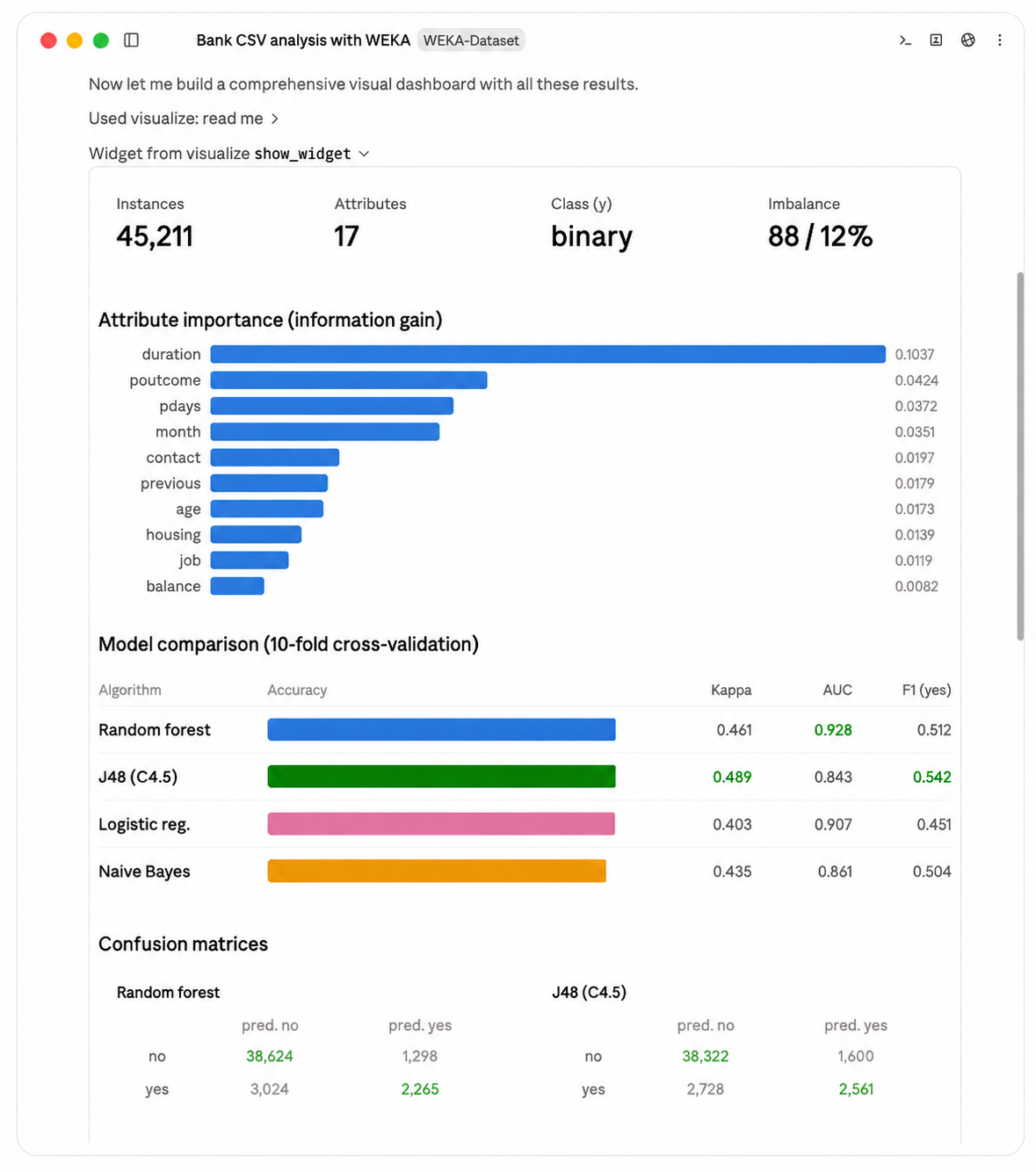
Weka MCP helps your AI assistant inspect datasets, prepare data, compare established machine-learning methods and explain the results through a guided, inspectable workflow.
Built on WEKA · 46 structured tools · Open source · Run locally or use the hosted demo
The Architecture
Weka MCP translates your requests into structured calls to WEKA. The MCP server handles the conversation, while WEKA performs the training, evaluation and prediction.
The experience feels conversational, but the machine learning remains fully WEKA.
From question to explained result
Tell the assistant what the dataset represents and what you want to understand.
Identify missing values, unsuitable attributes, imbalance and other data issues.
Receive a small number of appropriate model recommendations with explanations.
Train models, establish a baseline and compare performance.
Translate metrics, errors and model behaviour into practical language.
Retain the dataset assumptions, preprocessing, configuration and evaluation details.
The translator
A Node MCP server that turns each tool call into a weka-api REST call and nothing more.
Speaks both transports: HTTP on POST /mcp for remote clients,
and stdio for desktop ones. Finds the API through
WEKA_API_URL.
/healthzThe workbench
Java 17 and Javalin wrapping WEKA 3.9.6. This is where training, evaluation,
clustering, and diagnostics actually happen. Serialized models and uploaded datasets live
on disk, so a model you train stays trainable against later.
/app/models/app/dataIn the cloud, only one of them is reachable. On Azure Container Apps, weka-api has internal-only ingress, so it has no public DNS entry. Only weka-mcp inside the environment can reach it. Both apps also scale to zero and are capped at one replica each, so an idle demo costs close to nothing and a busy one can't run up a bill.
How to install WEKA-MCP?
Take the hosted server if you want to try it in the next minute. Run it locally if you want your data to stay yours.
Option A
It runs in open demo mode: no key, no header, no account. Point any MCP-over-HTTP client at this endpoint.
https://weka-mcp.ademartutor.com/mcp
Pick the client you use below. Each tab walks through pointing it at the hosted MCP endpoint.
Available for ChatGPT Plus, Pro, Business, Enterprise, and Education accounts through the ChatGPT web app.
Enter the following details:
https://weka-mcp.ademartutor.com/mcp
You can now ask ChatGPT to use WEKA-MCP tools for machine-learning tasks.
Custom connectors are available on the Free, Pro, Max, Team, and Enterprise plans through the claude.ai web app. Free accounts can hold one custom connector at a time. On Team and Enterprise, an Owner has to add the connector for the organization first. See below.
Enter the following details:
https://weka-mcp.ademartutor.com/mcp
If a Name field appears, enter WEKA-MCP. Otherwise Claude takes the name the server reports.
You can now ask Claude to use WEKA-MCP tools for machine-learning tasks. Claude asks for your approval the first time it calls each tool.
Members can't add a custom connector until an Owner has registered it for the organization.
You don't need a config file. WEKA-MCP is a remote connector, and connectors are attached to your Claude account rather than to one app. The same catalog serves claude.ai, Claude Desktop, mobile, and Claude Code.
Settings → Extensions in the desktop app is a different thing. That's for desktop extensions and local MCP servers that run on your own machine, so a hosted endpoint like this one doesn't belong there.
Only worth doing if you're on an older desktop build without connector support, or you want the server declared in a config file you control. It bridges the remote endpoint to stdio through mcp-remote, and needs Node 20 or newer. Add this to claude_desktop_config.json, then restart Claude Desktop:
{
  "mcpServers": {
    "weka": {
      "command": "npx",
      "args": ["mcp-remote", "https://weka-mcp.ademartutor.com/mcp"]
    }
  }
}
A few important technical considerations before getting started.
weka_upload_dataset a path like /Users/you/data.csv, it goes looking for that path on our machine and doesn't find it. You get back ENOENT: no such file or directory with your own path quoted in the error. Size has nothing to do with it, by the way. The 20 MB cap is a local install thing. If you want to work with your own data, install locally.iris has 150 rows and finishes instantly, so you'll never run into it there. Push up to 10,000 rows with RandomForest or cross validation and you'll hit the ceiling. That kind of work belongs on a local install.
You can drive the whole server with curl. Every call is a single
POST: no session to open, no handshake to send first, nothing left running in
the background. Two things to get right. Your Accept header has to name
both application/json and text/event-stream, and
the endpoint only answers POST.
Every request is a POST to the same URL, with the same two headers and a JSON-RPC 2.0 body. Only the body changes between calls:
curl -s https://weka-mcp.ademartutor.com/mcp \
  -H 'Content-Type: application/json' \
  -H 'Accept: application/json, text/event-stream' \
  -d '{"jsonrpc":"2.0","id":1,"method":"tools/list"}'
Body fields:
jsonrpc is always "2.0".id is any number or string. The response echoes it back, so you can match replies to requests.method is tools/list or tools/call. ping and initialize also answer; prompts/* and resources/* return Method not found.params is required for tools/call and carries name plus arguments.arguments is required even when the tool takes none. Send {}, not nothing, or the call fails validation.Since only the body changes, wrap everything else in a shell function. Paste this once into bash or zsh and the examples below stay short:
weka() {
  curl -s https://weka-mcp.ademartutor.com/mcp \
    -H 'Content-Type: application/json' \
    -H 'Accept: application/json, text/event-stream' \
    -d "$1"
}
These are not steps. Run any one of them on its own, in any order. None of them takes arguments, so they work no matter what state the server is in:
# every tool name
weka '{"jsonrpc":"2.0","id":1,"method":"tools/list"}' | jq -r '.result.tools[].name'

# is the server awake?
weka '{"jsonrpc":"2.0","id":2,"method":"tools/call","params":{"name":"weka_health","arguments":{}}}' | jq -r '.result.content[0].text'
{ "status": "ok", "wekaVersion": "3.9.6" }

# which datasets are uploaded?
weka '{"jsonrpc":"2.0","id":3,"method":"tools/call","params":{"name":"weka_list_datasets","arguments":{}}}' | jq -r '.result.content[0].text'

# which models are trained?
weka '{"jsonrpc":"2.0","id":4,"method":"tools/call","params":{"name":"weka_list_models","arguments":{}}}' | jq -r '.result.content[0].text'
Tools that need input read it from params.arguments. Each tool's
inputSchema, in the tools/list output, tells you which fields it
expects. Swap the placeholders below for real names from the two list calls above. This is a
public sandbox, so what's on it depends on who used it last:
weka '{"jsonrpc":"2.0","id":5,"method":"tools/call","params":{"name":"weka_evaluate",
       "arguments":{"model":"YOUR_MODEL","dataset":"YOUR_DATASET",
                    "method":"cross_validation","folds":10}}}' | jq -r '.result.content[0].text'
Results come back double wrapped. The payload you want is a
JSON string sitting inside result.content[0].text, rather than
JSON at the top level. That is why every example above ends in jq -r. To pull
out a single field, decode it twice:
weka '{"jsonrpc":"2.0","id":6,"method":"tools/call","params":{"name":"weka_health","arguments":{}}}' \
  | jq -r '.result.content[0].text' | jq -r '.wekaVersion'
3.9.6
A tool call that fails still comes back as HTTP 200, so don't go by the
status code. Check result.isError instead. When it is true, the
text payload holds the details:
{
  "code": "DATASET_NOT_FOUND",
  "technicalMessage": "dataset not found: does-not-exist",
  "userMessage": "The dataset could not be found.",
  "recoverable": false,
  "allowedRecoveries": ["stop"]
}
406 Not Acceptable means your Accept header didn't name both application/json and text/event-stream. Listing only one of them still fails.404 on a GET is expected. There is no stream to subscribe to, so every call has to be a POST.Option B
One command builds both services, picks free ports, and waits until the server reports healthy. You need Docker with Compose v2, and Node 20 or newer only if you want stdio.
git clone https://github.com/iamademar/weka-mcp.git
cd weka-mcp
bin/setup
bin/setup probes for free host ports — starting at 3001 for
weka-mcp and 7070 for weka-api — writes them to a generated .env,
builds, and waits for health. It prints the ports it chose. Internally the two services always
talk over weka-api:7070, which mirrors the cloud shape.
curl -s localhost:3001/healthz
{"ok":true,"wekaApiUrl":"http://weka-api:7070"}
cd weka-mcp && npm ci && npm run build

claude mcp add weka \
  --env WEKA_API_URL=http://localhost:7070 \
  -- node "/ABSOLUTE/PATH/TO/weka-mcp/weka-mcp/dist/index.js"
{
  "mcpServers": {
    "weka": {
      "command": "node",
      "args": ["/ABSOLUTE/PATH/TO/weka-mcp/weka-mcp/dist/index.js"],
      "env": { "WEKA_API_URL": "http://localhost:7070" }
    }
  }
}
The compose stack deliberately doesn't publish weka-api to your host, so
localhost:7070 won't answer out of the box. Either run weka-api directly
(cd weka-api && mvn -q package -DskipTests && PORT=7070 java -jar target/weka-api-*-shaded.jar)
or add ports: ["7070:7070"] to the weka-api service in compose.yaml.
bin/remove            # down -v, removes images, frees the ports
docker compose down   # stop containers, keep the volumes
Every tool is weka_-prefixed and typed. They're grouped the way you'd actually work through a problem:
inspect the data, transform it, train a model, then diagnose where it fails.
No tool matches that. Try train, diag, or dataset.
| Variable | Default | Purpose |
|---|---|---|
WEKA_API_URL | http://localhost:7070 | Base URL of weka-api. Compose uses http://weka-api:7070. |
MCP_HTTP_PORT | 3000 | Port the HTTP transport listens on. |
WEKA_API_TIMEOUT_MS | 210000 | Per-request timeout, kept under the ~240s ingress ceiling. |
INTERNAL_AUTH_SHARED_SECRET | unset | When set, POST /mcp requires X-Internal-Auth. Unset means the check is skipped. |
| Variable | Default | Purpose |
|---|---|---|
PORT | 7070 | Port Javalin binds. |
MODELS_DIR | /app/models | Serialized .model files. |
DATA_DIR | /app/data | Uploaded ARFF and CSV datasets. |
MAX_UPLOAD_MB | 100 | Upload size cap. The hosted demo sets this to 20. |
LOG_LEVEL | INFO | Logback root level. |
JAVA_TOOL_OPTIONS | unset | JVM flags. Compose sets -XX:MaxRAMPercentage=75.0. |
Locally, WEKA_API_URL carries a port: http://weka-api:7070. In the
cloud it must not. Internal ingress terminates TLS on 443 and maps to the
container's port itself, so the value is https://<api-internal-fqdn> with no
port at all.